Tracking Your SHEIN Orders: A Complete Guide
Being a renowned e-commerce platform, SHEIN attracts clients from around the world. It is always crucial to stay updated on the status of a purchase. Shein customers can use the order tracking functionality to find out if it is being processed, shipped, or delayed. This piece will cover how to find your parcel number, get delivery updates, return items, and request a refund. We will also answer some of the most common questions.
SHEIN Orders Tracking

As soon as you add items you like to your shopping cart and pay for them, you can monitor your parcel’s way in your profile or through the mobile app. There is a Shein unique code to trace your package from dispatch to delivery. If you’re going to do this, you need to follow these steps:
- Visit the SHEIN official site and sign in to your account.
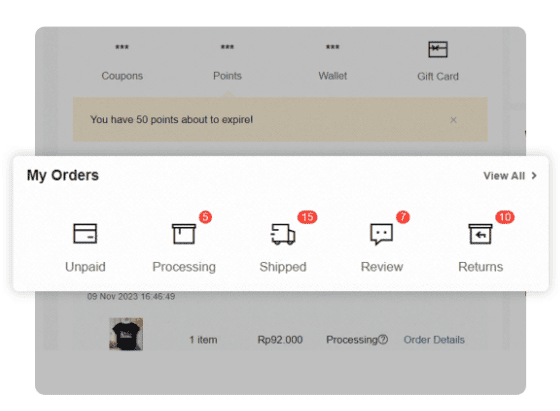
- Go to the Personal Center and find My orders (View All). You will see an overview of the unpaid, processing, and shipped orders.
- Next, you have to select the order you would like to trace.
- Press the black Track button or check the delivery information listed below. There are also some tips for receiving your order faster. If you see your order being processed, you actually have an option to speed it up by clicking on the “Expedite shipment” button. Already on the way? You can still have it delivered faster by clicking on “Urgent Delivery”. If you see some unusual pending, you can check the details and follow the instructions.
- When your order is successfully placed, you can confirm it by clicking Received and earn bonus points. You can also write a review by selecting the Review option.
SHEIN Tracking Number
Your tracing digital code from SHEIN is a unique code used to trace your package once your item has been sent. It’s essential for following your order’s journey. You can find it in several places:
- Email: Look for an email from SHEIN titled something like “Your SHEIN order has been shipped”, which actually provides two numbers: the order code and the tracking ID. You need the last one.
- My orders section: Log in to your account, go to “My Orders”, select the relevant order, and press Track. The tracking number will appear at the top of the screen among other shipping details.
- Logistics company website: You can use the tracking number on the carrier’s official site (e.g., DHL, MILE, or local postal service) for more detailed logistics updates.
SHEIN Order Status Updates
There are several common statuses you may see in your account:
- The Unpaid status means your payment has not been completed for many reasons, such as payment gateway issues, expired or invalid card, insufficient balance, or the bank declined the transaction.
- The Processing status means your order is being prepared for shipment. This typically takes 1–3 business days.
- The Shipped status says the package has left the warehouse, and tracking is now active.
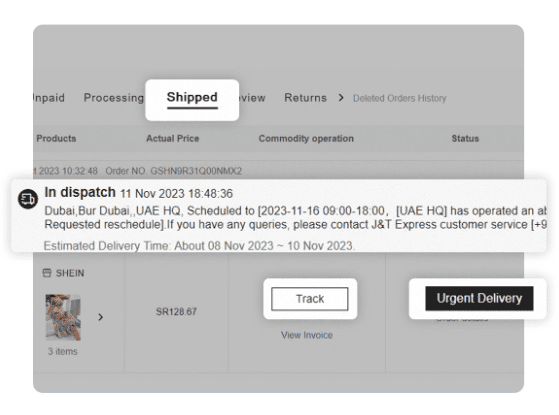
- The In Transit status tells us the parcel is moving through the carrier’s logistics network.
- The Out for Delivery status means the courier is on their way to deliver the package that day.
- The Delivered status appears when the parcel has successfully reached your address.
- The Delayed status can happen when there may be Shein order delays due to weather, customs processing, or logistical issues.
How to Make Returns and Get Refunds
Unless the items are underwear or swimwear, you may return them to SHEIN. First, you should check to see if it has been less than 45 days since the delivery of your goods, and they are still unused and unworn with tags attached.
In order to start a return, you need to go to “My Orders”, select an item you wish to return, and click “Request Return”. Then follow the instructions. It should be noted that you can only return items for free once.
After that, you should pack the item, attach the return label provided, and drop off the package at the designated center. Alternatively, you can schedule a courier pickup at home. After receiving your return, SHEIN will inspect the item, and you will be able to get a refund within 3–7 business days.
FAQ
What is SHEIN’s delivery timeframe?
Standard shipping generally takes 6–15 business days. As for express shipping, it can be faster depending on your place of residence.
Can I cancel my SHEIN order?
You can cancel your order if it still has the “Processing” status. Check the status and make a decision.
How to reach SHEIN customer service?
Shein users can contact support through the Live Chat on the website by sending an email or calling their customer service hotline (depending on the region; some regions do not have a hotline available).
Why hasn’t my tracking number worked yet?
Usually, it takes up to 24 hours for a number to be tracked. We recommend our readers wait at least one day before contacting Shein customer service with a complaint.
Are there any restocking fees for returns?
Fortunately, there are no additional fees for restocking for Shein customers.
 French
 German
 Spanish
 Polish
 Indonesian
 Finnish
Reviews